Editorial is a Windows text editor for the part that comes
after the first draft, when The Muse has run riot and
made a glorious mess all over everything, at which point
it falls to someone (usually you) to clean up this literary
carnage by fixing the damned manuscript.
Now with PDF and EPUB export and House Styles.
Revise
without
losing your
darlings


Windows 10/11 - One-time purchase







THE GOOD KIND OF WRITER’S BLOCK
A MANUSCRIPT DOESN’T HAVE TO BE ONE LONG FILE
Horizontal Editing
Every paragraph is a block, and a block remembers more than one version. One is live, the others wait
behind it, ready to be pillaged for parts, or swapped back in at 2:00 AM when you suddenly realize that
the original was better all along.
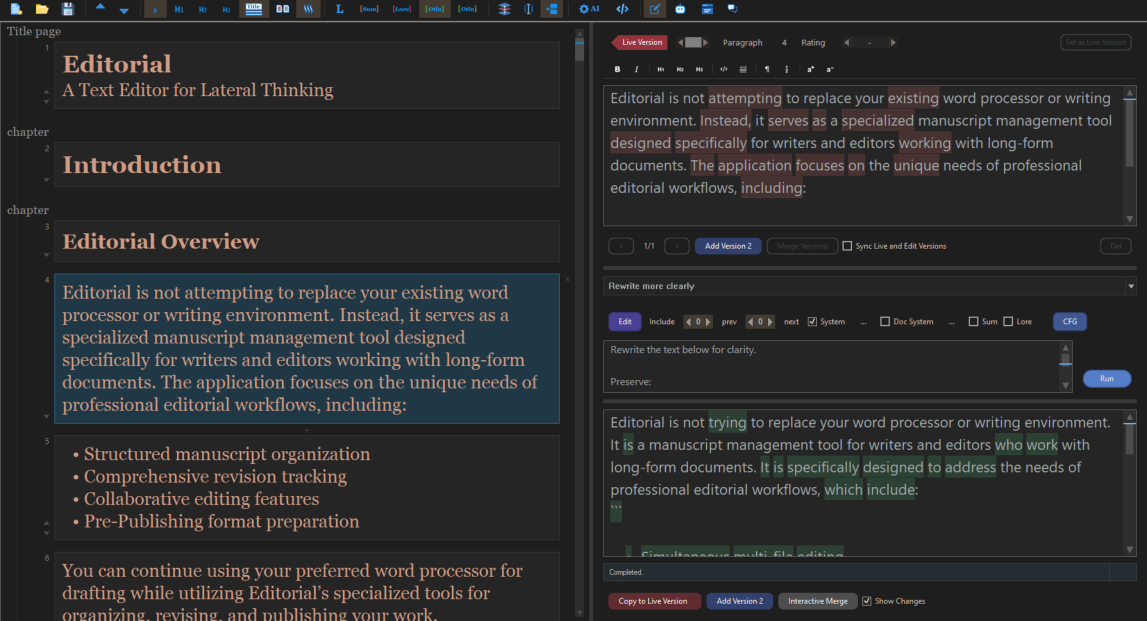
Write the draft, then take another pass to make it more tight. Then write a third version that is meaner and shorter and which you are still
not sure you have the guts to use.
All three versions stay in the same block for easy comparison, so you can switch back and forth between them at will, or grab one
sentence from the tightest version and paste it into the live one, followed by a complete rewrite of everything, into Version 4. And all those
blocks will keep every single version around forever and ever, amen.
BUT WHY, WHY, WHY?
I built this magnificent, wondrous tool
because I kept repeating the same stupid thing
I would take some perfectly good paragraph and rewrite it into what was clearly a superior version, only to awake the next morning with
the awful certainty that the "improved" version was actually horrendous compared to the original, which no longer existed.
And saving draft_v7_FINAL_FINAL.docx is not revision control. At best, it is an insanity defense against the unbearable pain of knowing you
are going to make the same idiotic mistake again and again and again.
So I wrote this editor that does exactly what I wanted – where rewriting a paragraph means leaving the original right there in front of your
face, silently laughing at you with contemptuous glee, anticipating with dreadful certainty the moment when you realize that the more you
do something, the worse it will be.
And that's The Idea! Everything else you see here, is merely an improvement to make the original idea even better!
AND HERE WE ARE
How a Simple Idea Got Completely Out of Hand
Since I am also my own best customer, I started adding all
the things I ever wanted a software like this to have.
If I was going to keep versions of every paragraph, then
naturally I needed a way to see exactly what had changed.
So came the diff tools. Then visual merging. Then a proper
spell checker. Now we have an entire vector editing suite…
And then came the inevitable question: if I can write and edit
the entire thing in Editorial, why should I have to leave
Editorial to publish it? So I added PDF, DOCX and EPUB
exports.
BEHOLD! AI as it was meant to be!
The AI is but an option
and cannot claim ownership of your dulcet voice
When you DO want a second opinion you can
ask LLM. Either one running locally on your
machine, or using your own API key if you
would rather use a cloud provider.
The LLM model sees only block fragments,
not your entire manuscript and whatever it
produces arrives as another version inside the
block.
It does not quietly replace the one you wrote.
You read it, then you decide, how to use it.
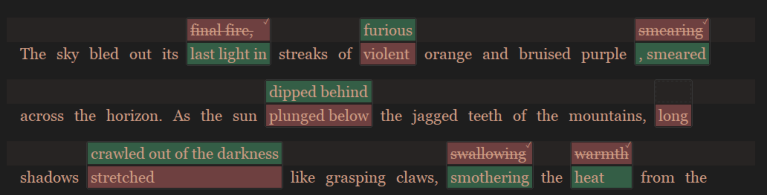
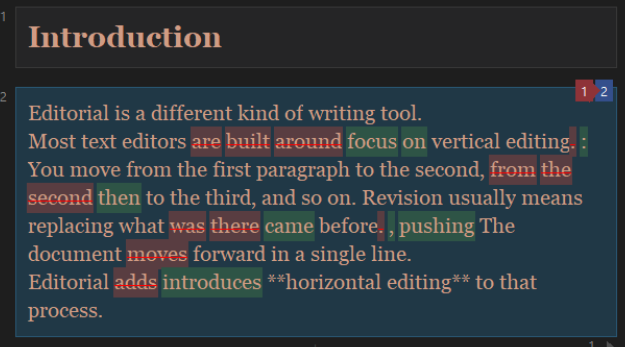
With the Interactive Merge you can see clearly what words AI wants to replace.
The Summary block takes care of all the boring stuff like remembering things by AI. And Simple Chat is fun too because it gives you an
excuse to act rude, since some poor artificial sap dared to disagree with you about something you wrote.
And if you have to do anything over and over, like turning something obscure into its opposite for giggles, then you just send in a little AI
agent to do it.
You can choose between either:
•
(a) the Editorial Agent which lets you graphically build up editing loops; or
•
(b) the fancy Script Agent where all you need to know about programming is that "The canonical way to write an Editorial Script is to
paste the syntax page into ChatGPT and ask it what you want."
Editorial works great with Local LLM engines such as LM Studio, Olama or llamacpp and local LLM is Cranky Man’s preferred LLM.
From the suffocating horror of revision
to the sublime joy of reading
HOUSE STYLE
Switch the document between Prose and
Technical presentation across Visual
view, Reading Mode, DOCX and PDF.
READING MODE
Read the manuscript in a calm, centered,
book-like format. Even pretend you like
your writing.
CHAPTER OUTLINE
See outline, word counts, jump instantly,
or drag an entire chapter to a new
position just to mess with your readers.
•
Illuminated openings
Add ornamental initials to eligible prose chapter openings, including a classical three-line treatment in PDF.
•
Import and Publish to DOCX and EPUB
Bring existing manuscripts into the block workflow and publish finished books back out.
•
Prompt Log
Inspect what every tool sent to the LLM, which model received it, its size, and the final outcome.
Release Notes
Because we use Editorial to write all our manuals, it evolves continuously through frequent updates focused on long-form editing, book-
style typography, manuscript navigation, richer import and export options, and transparent AI- assisted workflows.
Version 2.0 (9/16/2026)
•
Offline Thesaurus
Now you can see synonyms without even being online. This includes our famous thematic dictionaries from Novel Forge and a full
Thesaurus panel where you can directly see syninyms by just clicking on a word.
•
Word Explorer
It shows you a galaxy of connected words eir relationship.
•
Full Roundtrip for external editing with import merge. You can export your project for external editing in md format, then re-
import it later that will merge the changes to your project.
Version 1.8 (9/8/2026)
•
House Styles and Publishing
Prose and Technical House Styles now use consistent paragraph spacing and indentation across the editor, Reading Mode, DOCX, PDF,
and EPUB according to publishing rule book.
Reading Mode more closely reflects the finished publication.
Publishing rules for paragraph openings, lists, scene breaks, and illuminated initials have been refined for more professional results.
•
New Image Block Editor
Add editable rectangles, ellipses, arrows, text, lines, and freehand drawings. Use scripted Auto Shapes for complex object.
Image edits remain fully editable and participate in the document’s Undo and Redo history.
•
E-ink preparation. If you need images, you can now see how your color images look on e-ink B/W screen
Version 1.6 (8/3/2026)
•
House Style: Prose or Technical. A new top-level House Style menu switches the entire document between Prose (indented) and
Technical (spaced) paragraph presentation. The choice applies consistently to the Visual block view, Reading Mode, DOCX export, and
PDF export.
•
Reading Mode. The new book-style view removes block cards and presents the manuscript in a centered reading column. Click any
paragraph to select and edit its underlying block without leaving the reading page.
•
Illuminated drop caps. Prose documents can add ornamental initials to eligible chapter openings. Reading Mode uses a compact
two-line cap; PDF export uses a classical three-line black-on-white treatment designed for print.
•
Chapter Outline. A discreet handle on the left edge opens a chapter-level overlay without permanently taking screen space. Outione
recognizes both chapter labels and H1 headings, shows a preview plus word, block, and image counts, and highlights the chapter
containing your current selection.
•
Jump or reorder by chapter. Click a Chapter Outline card to jump to it, or drag the card to move the complete chapter as one
undoable operation.
•
Direct DOCX and EPUB import. File → More Import → DOC Files imports Word documents directly into Editorial blocks, including
headings, Markdown-compatible structure, and supported embedded images. EPUB books can now be imported in spine order with
headings, emphasis, and supported images preserved.
•
Prompt Log. View → Prompt Log shows the exact messages sent by Rewrite, Summary, Chat, Editorial Agent, Script Agent, and
connection tests, together with the model, an approximate token count, and the final outcome. It is now much easier to verify whether
lore, summaries, system prompts, or nearby blocks actually reached the model.
•
Improved connection management. Save, rename, delete, test, and switch among named LLM server configurations. Fetch and filter
a server's model list instead of entering every model name manually.
•
Replace in Blocks. Edit → Replace searches the selected block or the entire document, with Match Case and Whole Word options.
•
Visual Markdown tables. GFM-style pipe tables render as theme-aware tables in Visual mode, with a bold header, grid, alignment,
and wrapped cell text.
•
Consistent paragraph export. Paragraph boundaries inside a block are no longer joined into a single run-on paragraph during DOCX
EPUB or PDF export. Title-page lines also remain separate, matching the structure shown in Editorial.
•
EPUB and PDF Publish option with Metadata.
Version 1.5 (7/4/2026)
•
Interactive Merge: The new Interactive Merge view compares your block against the model's suggestion as a two-line chip display: click
any chip to accept or reject that change, or take whole rewritten sentences in one click.
•
Merge two versions of a block. The same tool works between a block's own versions via the new Merge Versions button — weave the
best sentences of two drafts into one and save the result over the current version or as a new one. A color-coded selector steps
through the block's other versions.
•
Blocks with multiple versions: Split and join now work on any text block, no longer only on single-version blocks. Splitting maps your
chosen split point into every version by sentence alignment; joining combines versions slot by slot.
•
Simple Chat turns the right pane into a plain conversation with your configured LLM - for questions, brainstorming, and research that
shouldn't touch the manuscript.
•
Markdown round trip with images (More Export → Export MD file with images) writes your manuscript as markdown plus every Image
block as a PNG in a <name>_images folder, referenced from the text. Image effects are baked into the exported pixels. More Import →
MD Files with Images re-imports the markdown and rebuilds the Image blocks — edit your text in any external editor and come back
without losing the images.
•
File safety: Rotating backups on every save (.bak1–.bak3 next to your file), timed autosave to a sidecar file, and crash recovery that
offers your latest unsaved changes on the next open. Configure both under Settings → Safety Settings.
•
Other fixes and small additions
Version 1.1 (5/1/2026)
•
Reworked text import and auto-splitting into a more robust version that preserves markdown structure. (goal is more reliable
markdown round trip - like exporting in markdown, then importing it again to editorial)
•
Markdown headings, lists, tables, code blocks, blockquotes, and dividers are now kept as structural blocks instead of being merged
into surrounding text.
•
Large prose and dialogue blocks are split more evenly at natural line or sentence boundaries.
•
Short prose fragments are merged more intelligently, while dialogue stays separate from narration.
•
Improved chapter-heading detection to reduce false positives such as normal sentences starting with “Part” or “Book”.
•
Added Settings > Text Chunking controls for merge length, maximum block length, heading demotion, and prose chapter detection.
•
Fixed markdown tables being split across multiple blocks during import.
NEW IN EDITORIAL
Full Vector Editor for Image Blocks
If you have to create a manual with screenshots and arrows, or a
guide with callouts, or any kind of technical chapter where the
diagram has to actually mean something important (like a schematic
showing how to wire up the flux capacitor), then it's always the same
thing: fire up image editor and make a PNG, then paste that PNG into
your manuscript.
And when you realize that one of the labels is wrong, then you have
to do it all over again!
Well, no longer! With the new and improved Image Block vector
editor, you can actually edit images right inside your document
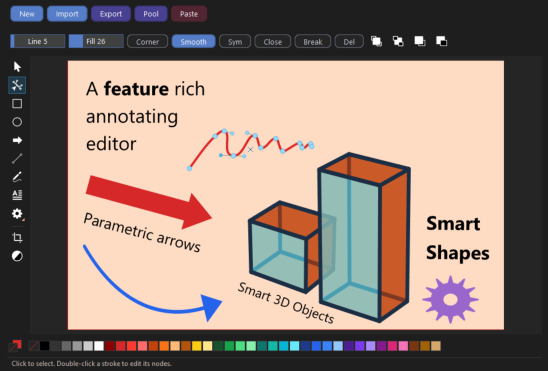
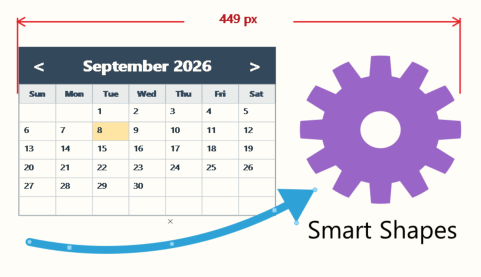
One genuinely novel feature: parametric vector shapes created by a
script. Arrows, cogs, speech bubbles, or even a calendar!
Don't panic though, as we published a complete AI-ready script guide,
so a coding-capable LLM can write one for you. There are plenty of
examples too, from a simple arrow to speech bubbles to 3D objects.
At that point, what started as a slightly obsessive solution to my inability to trust my own revisions had somehow turned into a small
publishing suite. And I'm not stopping there.
Because giving a Cranky software developer free rein is how perfectly reasonable idea gets completely out of hand.

Cranky Man Says:
Offline Thesaurus - and not just one
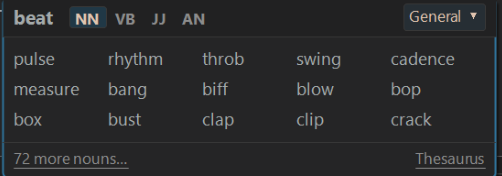
Oh, remember when things were in the software instead of requiring an
Internet connection for everything? I sure do! And it was glorious! Now
you can't even sneeze without going online to look up "how to sneeze" on
YouTube first.
Well, The New Thesaurus is your time machine back to those simpler
times! It's completely offline (Hallelujah!), comprehensive, and includes
thematic dictionaries (borrowed directly from Novel Forge).
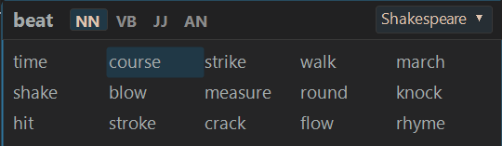
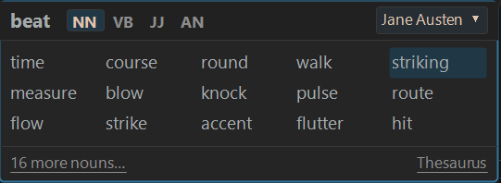
Thematic Dictionaries show us all of the words that were
actually used by authors writing in that genre and time
period. They are like little windows into the actual language
of the time!
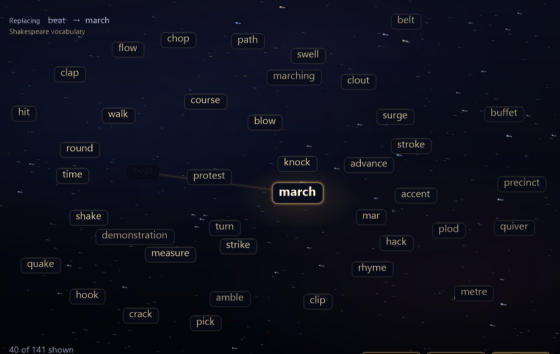
Well, the Word Explorer lets you wander through an entire galaxy of
words that are all mysteriously connected, and whose sole purpose in life
(as far as I can tell) is to enlighten you, if not actually make you smarter by
expanding your paltry vocabulary.
Thematic Dictionaries
World Explorer