Thematic Synonym Dictionaries
Additional Assistants and Dictionaries not included with the installation.
These files need to be copied in the appropriate folder in NovelForge document
folder.
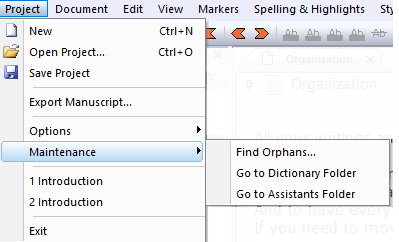
How to find document folder?
From the Software, go to menu
Project - Maintenance - Go to Dictionary/Assistants folder
or look for
C:\Users\<your name>\Documents\NovelForge\
If you don’t see this folder on your Windows 10, it will be in:
C:\Users\<your name>\OneDrive\Documents\NovelForge\
(Note for CQuill, this would be …\Documents\CQuillWriter\)
Additional files
Unzip and put them in your document \CQuillWriter\Dictionaries\ sub folder.
Classical Sc-fi
Based on 1950’s Sci-Fi authors, devoid of modern terms
Ernest Hemingway
Known for his use of short and direct words, this is Ernest Hemingway’s vocabulary

























Dctionaries and Assistants
PDF Manual
This is the manual for version 4.0 with many new additions
•
Export to EUB, DOC and PDF
•
Full Markdown editor
•
Redline Editor
•
Distraction Free Editor
•
Neural Voice Reader - fully local neural engine that reads your
manuscript to you using natural voices
•
Print support