home | products |web boards| faq | galleries | contact | about  
multimedia autorun autorun
download multimedia buy now graphics multimedia search


Real-Draw
Overview
Vectors
Bitmaps
3D
Illustrations
Web & MM
SVG
Mega Render
PSD Export

Resources
Plug-ins
WEB Scripts
Tips & Tricks
Gallery

History

Help
Index

Photo-Brush
Start here

DVD Menu Studio
Start here

DVDlab
Start here

CompactDraw
Start here

PhotoSEAM
Start here

Multimedia Builder
Start here

Other tools
UltraSnap
Camera Tools
Barometer


Real-Draw PRO 4
Create professional web or multimedia graphics from simple images, buttons, banners to whole interactive web page and rollovers.

Real-DRAW Pro happily combine vector, 2D, 3D and bitmap editing in one drawing package. It seamlessly moves from one form to another, eliminating time-consuming conversion operations and the need for multiple drawing packages.

For Windows 95/98/NT/2000/XP

Unlike other graphics packages Real-DRAW PRO offers a fresh new approach for creating graphics. It gives users unlimited creative power with tools you can hardly find in other packages.

Real-DRAW PRO is a uniquely versatile application with no limit to the quality and style of output.
You can create for example:

That's all in one package.

For the first time there is a user-friendly drawing program with flexibility that matches your creativity instead of hampering it!

Real-DRAW PRO combines many artistic creative methods into one application:

Vector Editing
Flexibility first! Any object you create is editable all the time. You can change shapes, group objects, move them in layers, resize, edit envelopes etc. Any object has its own changeable properties like color, texture, outline, lights, material, transparency, multiple 3D effects, bevels, shadows, motion blur and much more.

Bitmap Editing
Unlike in a normal vector editor you can actually paint directly onto any vector object using airbrushes, 3D or Artistic brushes and special Image Nozzles. You can paint on the canvas and the strokes will become another object to which you can apply effects, just as with vector objects. No other program can do this.

3D Effects
You can apply various bevels and extrude effects to any object or bitmap to create perfect three-dimensional work. You can get even closer to rendered-like image by applying an unlimited number of 3D lights to any object or by changing its material properties. For example, Real-DRAW PRO makes it very easy to create realistic metallic textures - often a big problem in standard vector drawing packages.

Web Page HTML Slicer
Use any of the amazing effects Real-Draw can offer to create a great graphics and then export it as a web page with rollovers, links and a text. The HTML Slicer is a visual tool which assist you to create web page without the suffering from creating HTML tables and working code in web editor.

Illustration Package
The combination of Real-DRAW's tools allows you to create drawings in your style - illustrations, 3D render simulations, airbrush work, you name it - you have the control.

Multimedia Graphics generator
With Real-DRAW you can design a whole scene and add fully-functional buttons (which is now easier than ever using Packages)
Then you can export it directly to Multimedia Builder or generate a script in any language you want - you can create HTML, XML, Java, Java Script or even a whole web page using CSS (Cascading Style Sheets).

SVG editor
As if this isn't enough, Real-DRAW can also be used as an SVG editor (Scaleable Vector Graphics supported by all XML enabled web-browsers) with import/export support of color fills, outlines and transparencies.

Mega Render
Design small, render big! A special Mega Render export module allows you to render the design into much larger image sizes if you need them. Mega Render will not just resize the image, but it will add more texture detail as well.

Export to Adobe Photoshop
You can export the whole design into Adobe Photoshop keeping all the layers, transparency channels, shadow layers and layer names as you created them in Real-DRAW.


If you see anything interesting on this site which you think would be worth for your friends to know, simply click this button:

The link to this page will be included automatically.
No SPAM! Neither you, nor your friend will become part of ANY mailing list.

"New tools, effects, formatting power, output options and Web authoring keep Real-DRAW Pro's creative pot bubbling."
Tom Arrah

Read full review on designer-info.

For:


  • New 4.0 version changes the interface and add many other improvements.
  • See new DVD Menu Studio based on Real-DRAW PRO
  • Real-Draw PRO is a very competetive tool
  • It brings you many new features, such as:
    • Automatic WYSIWG HTML slicer.
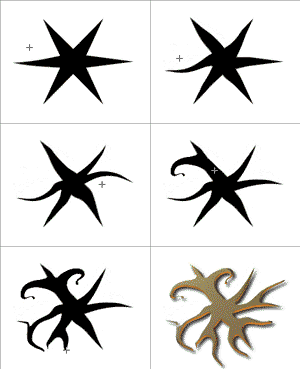
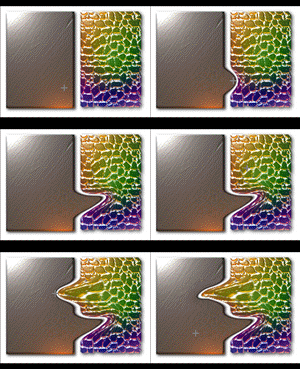
    • Unique Push-Back tool for creating interlocked objects
    • Boolean operations
    • Ability to vectorize painted objects or trace shape from bitmaps
    • Fit Text around Path
    • And more: Read the History page.

Click this button on left to read how to upgrade to version 4.0

  • New Multidocument interface with dockable bars
  • Flexible, non-destructive, always editable editing
  • Create never before seen realistic graphics
  • Robust 3D lighting system
  • Export SVG Scalable Vector Graphics
  • Export to Adobe Photoshop with separate layers
  • Design interactive web pages using CSS
  • Blueprint with cloning
  • Export with a detailed preview, ability to use Export Plugins.

 
Interface (Click to see in large view).

This is all crafted into one consistent package where all the methods blends together without limitation: If you want, you can for example apply bevel and lights to a bitmap, add drop shadow to an airbrush stroke and apply blur to a vector object.


The
full price is only $55.

You can now use new, faster ordering from SWREG

Register Real-Draw using SWREG
$55
Register Real-Draw using REGSOFT
$55
Options

Reviews:

Real-DRAW Pro, Real Powerful
"... I have repeatedly been blown away by all the features that have been packed into this program."
Sue Chastain reviewed Real-Draw PRO for About.com

Amazing vector and bitmap power...
"... Real-DRAW Pro wouldn’t look out of place being produced by the likes of Adobe..."
Tom Arah reviewed Real-Draw PRO for PC Pro October 2001 and designer-info

"Real-DRAW turns graphics tasks that usually take several steps (and often several programs) into simple jobs."

"PhotoShop has some competition", TUCOWS

"Real-DRAW offers you many new and innovative methods such as bitmap cloning, blueprint with onion skin or Packaging, and Package Clones which divide projects into logical blocks that can be worked on individually."

Images on this web-site were captured with UltraSnap and created with Real-DRAW PRO

Adobe Photoshop is a trademark ©2001 Adobe Systems Incorporated

 
© www.MediaChance.com 2000