
FAQ
Cranky Man’s Visual Multi-Sample & Drum Kit Creation for Teenage
Engineering EP Series of Sampler and Sequencer
(Currently Windows only)
What’s the purpose of this?
EP-40 has a legitimate mini multi-sample engine. Normally, when you load a sample into a cheap sampler and play it up the keyboard, it just speeds up the
audio. Low notes sound like a demon, high notes sound like a chipmunk. That is bad. Or good, depending on your taste.
Multi-sampling means we assign different recordings to different parts of the keyboard. You record the piano at C2, C3, and C4. When you play low, the
engine triggers the low recording. When you play high, it triggers the high one. This makes instruments sound more real.
That’s the first, simple part: A better sounding instrument.
Nnow here is the Cranky part:
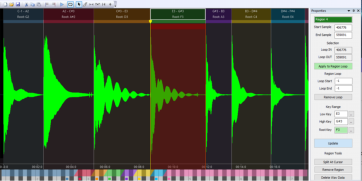
Since the engine doesn't actually care what is inside those "Regions," you don't have to use them for a piano or a synth. You can abuse the system.
•
Region 1: A Kick Drum.
•
Region 2: A Snare.
•
Region 3: A vocal chop of someone screaming.
Why would you do this?
Because you have only 12 pads per group. Instead of wasting 8 separate pads to lay out a drum kit (or scream kit if you must) you pack the entire kit into
Pad 1.
You put the EP in "Keys" mode, and suddenly the Pad 1 is an entire sound menu. You still have 11 pads in the group for other things, like basslines or... I
don't know, silence? We could all use more silence.
Why this doesn’t work on Medieval or KO2?
Different coping mechanism? Teenage Engineering and the Cranky Man are actually quite similar. They both get distracted. The
difference is how that distraction manifests.
When TE gets distracted by a new idea, they release a firmware update wrapped inside a reggae-themed music sampler while the
previous thing is still unfinished.
When the Cranky Man gets distracted, you get 226 historic microtonal tunings, a physics engine that bounces balls when the screen
is empty, and PaulStretch while it still only works on Windows.
For the record:
The Cranky Man hopes they will fix it. Truly. Deeply. But the Cranky Man has no power over this. Nobody listens to him.
What are the EP-40 limitations?
There are two hard limits:
•
Maximum 8 Regions per single sample
•
Maximum 20 seconds per combined multi-sample
These are hardware-imposed limits of the EP-40. Not a setting. Not something Cranky Man forgot to implement.
How do I fit longer samples into EP’s 128 MB memory?
Tastefully. By cheating.
You can use two of the EP Audio Editor build-in tools:
•
Double Time (+12 semitones)
Samples are sped up 2×, so instead of 20 seconds you can effectively fit about 40 seconds of a chipmunk like sounds.
The Editor automatically sets the instrument pitch to -12 so it plays back at the original speed on the EP.
•
SP-1200 Trick (+5 semitones)
Speeds the sample up ~1.33× and compensates with global pitch. Simulates sampling LP’s on SP settings. Adds a bit of nostalgia.
How do I fit more samples?
If your sound doesn’t need all the sparkle, don’t feed it 44kHz.
Resample down to 22kHz. This saves half the memory. Some sounds tolerate this better than others (for example, bass vs. cymbals). You can always call it
“retro.” See the menu ReTime/ReSample.
For the ultimate 75% squeeze, use 22kHz + Double Time. Own the crunchy sound!
Why did the software turn my beautiful stereo sample into Mono?
You have 128MB and probably 95% full. A stereo file is exactly two times the size of a mono file.
Currently, the software automatically converts all files to Mono to save you from yourself. (Just as the factory loops and samples on EP-40 are in mono)
Technically, many of the internal functions are already stereo-capable. Will there be a full stereo support? Eventually. Once there is nothing more important
to do.