



PureImage NR is a wavelet noise reduction and color matching software for digital images.
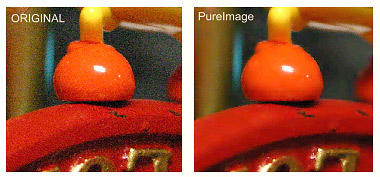
The wavelet process produce high quality noise reduction while retaining image sharpness and details.

PureImage NR, Wavelet Noise Reduction










PureImage will automatically auto-tune the noise function to different noise type across the image, making the interface much simpler and universal for all digital or film cameras.
There are few Advanced Processing presets for better tuning the NR algorithm


Default Mode
Performs well on most digital camera images. You can fine-tune the NR level and edge sharpness.
Nature Mode
Retain fine details in outdoor images with lots of trees, flowers and grass
Portrait Mode
Keep natural facial texture on close-up portrait photography to avoid a "face-lift" look of the model.
High Noise Mode
Works on very high level of noise produced by high ISO settings. Even some of the most extreme cases could be restored.
Scanner Mode
Remove Moiré pattern from high resolution scans using special de-screen filter.
Features
Advanced Wavelet Noise reduction
Quick constant preview of the noise being reduced
Optimized Color Matching and Correction
Has build-in rotation tool
Advanced De-screen filter
Curves and Histogram display
High quality JPEG output with Auto-Quality
Supports various input/output formats: JPG, PNG, BMP, TIF, TGA, RAW etc..
Drag and Drop files from explorer
Open Next/Previous file in folder with one button
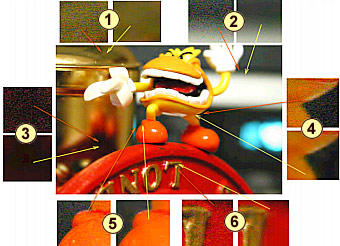
The image shows the self-adaptive feature of our Noise Reduction on few complicated parts of the image. (The middle image shown is after NR):
1. Metallic and shiny objects
2. Smooth transitions
3. Flat black surface
4. Out-of-focus transitions
5. Sharp transitions
6. Complex grain
Color Correction
Shadows and Highlights Levels
Adjust the image in Shadows and highlights which will give your dull image a punch
Exposure Compensation
Fix a exposure of your image, bring up details from shadows or tone down over-burn image
Color Temperature Filter
Adjust image warmer or Colder and fix a color cast from flash or wrong White balance.
Color Boost
Boost colors to make your image Vivid (this is NOT the same as a conventional saturation)
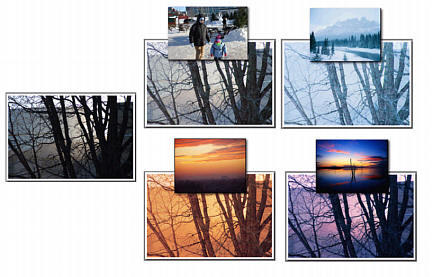
Color Matching
Picasso (or someone else) once said: "Good artists copy, great artists steal."
Do you like the tone and colors of some other image and want to use it in your pictures? No problem! Just load the reference image in Color Match and the advanced matching and optimizing algorithm
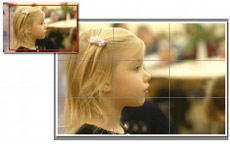
Crop to Format
A crop is the most effective tool to make your image look finished on the final medium. PureImage mimic the Photo-lab enlarger function. You can clearly see how the image will look on finished format size and you can also use the famous rule-of-thirds grid.
Auto-suggest JPG Quality
No more guessing what JPEG quality you have to use during saving. The Auto-Suggest will find the optimal quality for you (the maximum quality setting that match the source image)

Share this free software:
RAW Files Support
PureImage does support RAW files… but the last version was compiled in 2008 so sadly not all cameras today will be supported. So you may try RAW files, but probably the best would be to stick to png or jpg.


Get Download Link
If you want 21st century Noise Reduction and more, check out our
Ai Photo & Art Enhancer





![[x]](index_html_files/close.png "Close")


