
 DCE Tools Essentials bundle is a series of seven
professional Photoshop plugins for correcting, enhancing and
fixing the most troublesome problems with today digital
photography.
DCE Tools Essentials bundle is a series of seven
professional Photoshop plugins for correcting, enhancing and
fixing the most troublesome problems with today digital
photography.
This is 32-bit plugin.
You can run it inside 64-bit Photoshop with
Plugin
Bridge
DCE Tools Essentials

DCE Tools Essentials
DCE Tools is set of seven clean plug-ins, each perfectly tweaked for only a specific task.
List of plug-ins in the DCE Tools, Essentials bundle:

| 1. AutoEnhance | |
|
|
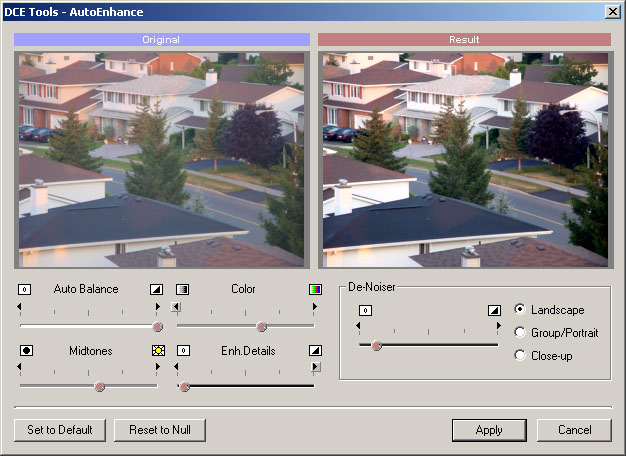
This is a popular all-in-one choice for
quick improvement of any digital
pictures.
With options like Auto Balance, Midtones, Color and Noise Reduction it can improve even photographs that seems to be fine at first look. Just run it through AutoEnhance and you will see that even good photo can be made better! |
| 2. ColorCast Correction | |
|
|
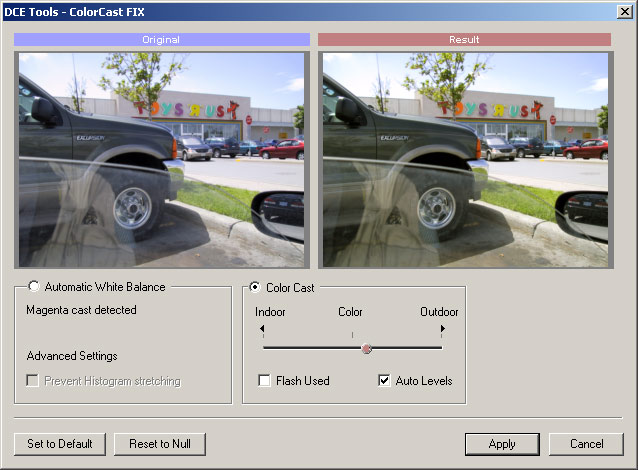
Create Vivid images! Almost all digital
images suffer from some sort of color
cast. The Color Cast Correction plug-in can automatically tell you what type of color cast you have (for example Blue-Magenta) and it allows you to remove it with Automatic White Balance or adjust its look with semi-automatic Color Cast slider. |
| 3. Exposure Compensation | |
|
|
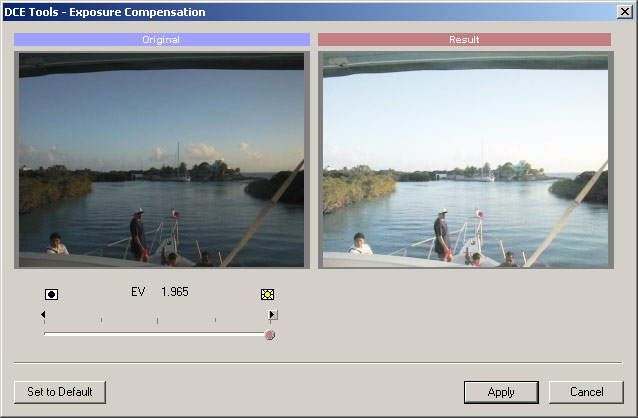
Are your photos under or over exposed? No problem. Simply Compensate the exposure as if you are still working on the picture with the camera. The image is not just brighten or dimmed but the whole dynamic range of the image is changed. |
| 4. Hot Pixels Fix | |
|
|
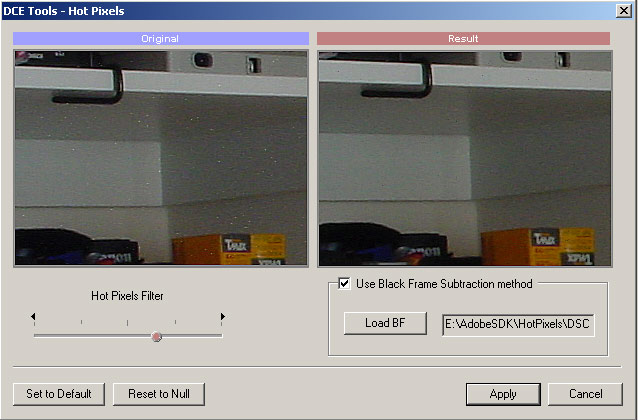
Hot Pixels can be noticed on many
digital cameras when you use exposure
longer than 2 sec. These will show on
image as a bright white spots. You can either use a filter which will try to eliminate these spots or use a more precise black frame method and adjust its effect. |
| 5. Lens Distortion Correction | |
|
|
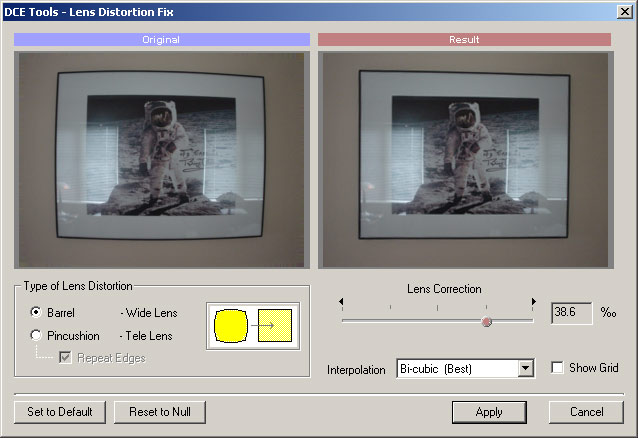
A typical digital camera lenses suffer
from Barrel distortion (wide lens) or
Pincushion distortion (when zoomed). With the Lens Distortion correction plug-in you can fix both of these types of distortion. The result is rendered using high quality Bi-cubic interpolation . |
| 6. Perspective Correction | |
|
|
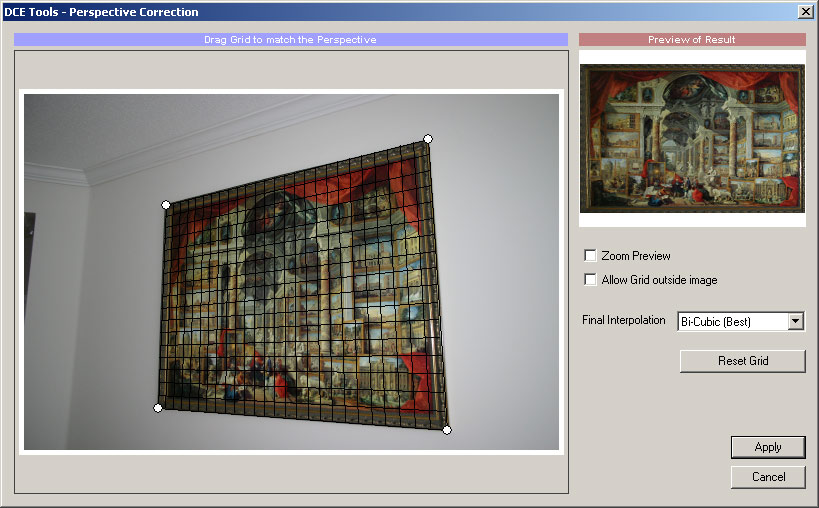
With perspective correction you can
straighten photos of pictures or
buildings when taken from an angle. Simply fit the grid to the object edges and the reverse correction using high quality Bi-Cubic interpolation will show the image as if it was taken with your camera in the exact right angle. |
| 7. Portrait Skin Cleaner | |
|
|
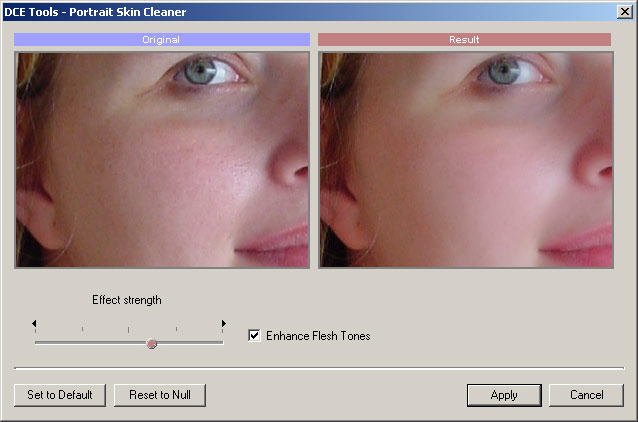
The Portrait Skin Cleaner plug-in will
smooth out the skin of your model while
preserving the details of eyes or hair. You have the ability to adjust the strength of the filter and create clean yet naturally looking advertisement-like soft skin. |
Compatibility
The plug-ins are for Windows platform. They work on XP, Vista, Win7 32 bit or 64 bit but only in 32 bit applications.
Plugin
works only for 32 bit Photoshop host.
For example the plug-ins work on Win7 64-bit if
run inside 32 bit Photoshop CS5
You can run it inside 64-bit Photoshop with Plugin Bridge
Note: Photoshop since CS4 installs both versions 32 bit and 64 bit on all 64 bit platforms. The 64 bit version of Photoshop is in Program Files, the 32 bit version is in Program Files (x86) folder and you can choose which one to run at any time. Our plugins will work only if installed in the 32 bit version of Photoshop in Program Files (x86)
The compatibility include (but it is not limited to):
- Adobe Photoshop 5, 6, 7,CS,CS2,CS3,CS4,CS5
- Adobe Photoshop Elements 1 and newer
- PaintShop Pro 8 and newer
- Photobrush 5
The best is to download Trial Versions and test them with your application to see if it is compatible or not.
System Requirements
Minimum System Requirements
- Microsoft® Windows® 7, Vista or XP (32-bit or 64-bit editions)
- 32 bit compatible host application such as Photoshop
- 1 GHz processor or better
- 2 GB of RAM
- 1 GB of free disk space
- Minimum screen resolution: 1024 x 768 (highly recommended higher resolution)
Free Trial
Platform: XP, Vista, W7 (32/64 bit) but only for 32 bit hosts
DCE Tools Essentials (Info)
series of seven professional Photoshop plugins
for correcting, enhancing and fixing the most
troublesome problems with today digital
photography.
- dctools1.exe (1.2 MB)
- You can run it inside 64-bit Photoshop with Plugin Bridge
 Redynamix (Info)
Create High Dynamic Range effect from a single
image. This plugin will give your ordinary image
a "punch" with vivid colors and crisp color
tonality
- redynamix2.exe (2.2 MB)
Color! Color! (Info)
Create High Dynamic Range effect from a single
image. This plugin will give your ordinary image
a "punch" with vivid colors and crisp color
tonality
- colorcolor.exe (0.5 MB)
- You can run it inside 64-bit Photoshop with Plugin Bridge
May we suggest?

Save on all
Get all the plug-ins and save!
You can have completely all of our plug-ins for just $52. Click
here...