
 The difference between fine and ordinary photography is in
the small details how our brain perceive the light
captured on the image.
The difference between fine and ordinary photography is in
the small details how our brain perceive the light
captured on the image. Orbis Luminum is stand-alone application that affects the light of an image by a special subtle way so the image will appear more clear, life-like and pronounced.
Orbis Luminum

Overview
There is only one control: the orb.

We tried to make the Orbis Luminum as simple as possible:
- There are no sliders.
- There are no numbers.
- There is only one control, the Orb.
- Works on JPG or RAW images
- Works on single image or batch of images
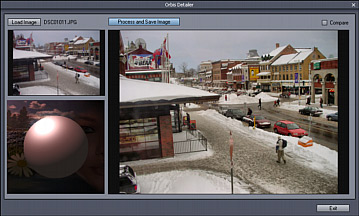
ORB Control
There is only one, single, self-explanatory control - the Orb that smoothly changes the perceived light according to the type of photography and the photographers taste.
The Orb controls the mixture between Landscape and Portrait processing and between smooth and texture enhanced output. Underneath is our proprietary algorithm that does the rest.
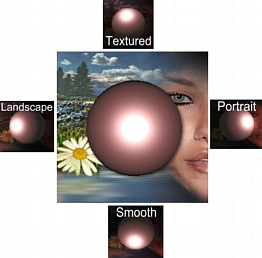
On left side we are working with landscape photography, on the right side we turn the orb to process portraits. Turning the orb up will enhance the textures (not by sharpening!) and colors (not by saturation!) while turning it down will keep it smooth. Everything else is in between.
Just Try it.
Examples
Orbis Luminum affects the light by a special subtle way so the image will appear more clear and pronounced. Sounds pretty vague, right? The best would be to look at some examples.
Example 1:
The image on the left is the original image. Now
we move the Orb towards the Landscape and up to
increase texture.
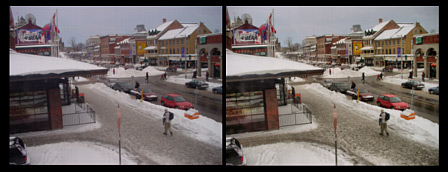
The result? The haze is gone. The image appears more uniformly exposed. It appears as if the details are more pronounced (there is no sharpening process in Orbis Luminum)
Example 2:
The image on the left is straight from the
camera. Now we move the Orb towards the Portrait
side.
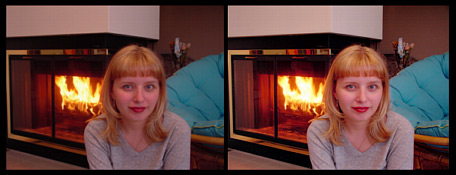
The result is as if we suddenly switched on additional fill-light. On the original image the person blended with the surrounding, on the processed image the person pops out. Additionally, which would be visible on the full image, the skin is smoother with reduced blemishes.
System Requirements
Minimum System Requirements
- Microsoft® Windows® 7, Vista or XP (32-bit or 64-bit editions)
- 1 GHz processor or better
- 2 GB of RAM
- 1 GB of free disk space
- Minimum screen resolution: 1024 x 768 (highly recommended higher resolution)

Free Trial
Platform: XP, Vista, W7 (32/64 bit)
Orbis Luminum
Stand-alone image processor featuring only a
single control: the orb.
May we suggest?

Dynamic Photo HDR
Check out the DPHDR application for making most of your pictures...